|
Global Anti-Pass Back
Anti-Pass back is the ability to restrict a card at an entry
or exit reader based on the status (IN/OUT) of the cardholder. With EntraPass
Global Gateway, anti-pass back can be defined using readers on different
controllers.
Express Setup
Express Setup will automatically define all the necessary
system components. This innovative feature reduces the time required to
configure the system and eliminates programming errors.
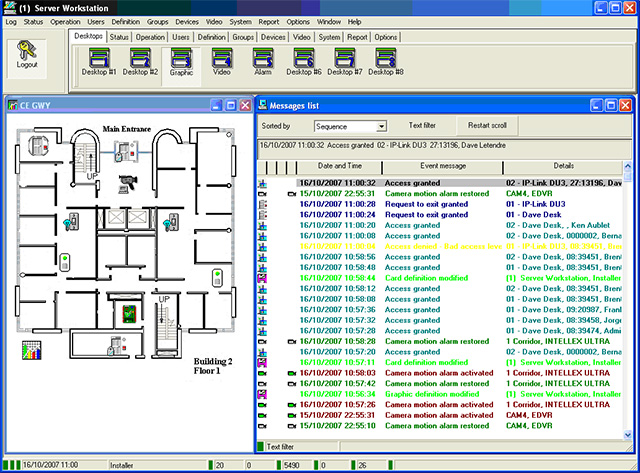
Configurable Desktops by Operator
Each operator can be assigned up to 8 configurable desktops.
These desktops display selected windows featuring message events, user photos,
filtered events, alarm instructions, high-resolution graphics and global alarms.
Desktops can contain any combination of windows.
Enhanced Video Integration
Integration with American Dynamics TM Intellex API v3.1 or
higher provides real-time video monitoring as well as video playback. Video can
be linked to access events from one to sixteen cameras and different DVRs
simultaneously.
Different views (1x1), 4 (2x2), 9 (3x3), 15 (4x4), presets,
sequences and dome control are available through the EntraPass software. All
cameras can be called up directly from a floor plan simply by double-clicking on
the icon! The video integration feature requires Intellex DV8000 and V16000
video servers and compatible cameras.
This video integration drastically increases security by
allowing visual observations of monitored areas and allowing security personnel
to link an access control event to a video clip directly from their access
control application.
EntraPass Video Vault Option
EntraPass Video Vault enables all video clips from an
Intellex alarm or EntraPass video alarm to be automatically stored as. AVI files
or KVI (Kantech Video Intellex) and KVA (Kantech Video Archive) files which can
be password protected.
Each EntraPass Video Vault may be connected to as many video
servers defined within the EntraPass software.
Video may be saved to up to 24 pre-programmed hard drive
locations. A .bmp image may be associated automatically to each video clip, and
a thumbnail image may be created of the first frame of the clip.
SmartLink for Simple System Integration
The SmartLink function allows real-time interfacing with
most intelligent devices such as CCTV multiplexers, paging systems, automated
e-mails, HVAC systems, etc.,by using an RS-232 or network connection between the
system and the third-party device.
SmarkLink for Advanced System Integration
Advanced system integration can be accomplished by using the
bi-directional SmartLink to communicate with software applications such as Time
and Attendance systems, Badging systems, Human Resource Management systems,
Student Registration systems, etc. through TCP/IP, RS-232 port or with DLLs.
This allows complete and real-time data exchange between systems, eliminating
redundant data entry.
Alarm System Partitions
A site can be divided into 100 alarm system partitions. Each
alarm partition can then be configured with any number of readers, door
contacts, motion detectors, sirens, user access rights an arming schedules.
Interactive Floor Plans
EntraPass Global Edition can import and display
high-resolution graphics created on CAD-type systems, allowing you to design a
graphic-based system that operators can use with minimal training. Interactive
icons can be added to floor plans to display component status and offer full
manual operation of the component in real time.
Import High-Resolution Graphics
EntraPass Global Edition can import and display
high-resolution graphics allowing you to design a graphic-based system that
operators can use with minimal training. Icons can be added to the graphics for
real time control of systems with a mouse click. Import High-Resolution
Graphics.
It is important that you have a computer that meets minimum
system requirements to support the software application. Necessary requirements
for the Workstation, Gateway & Server include:
- Minimum processor Pentium III 800 MHz
- Minimum RAM recommended 256MB
- Minimum free hard disk space 4GB
- Color depth 24-Bit (16 million colors)
- Network Interface Card 100 base T network adaptor
- Operating system compatibility Windows 98/XP/NT/2000
|

 zoom
zoom